
Playershops

Ever wanted to own your own store and sell items to other players? Well, now you can! Visiting playershops by using /warp playershops takes you to a world full of different stores! In this area, you're more than welcomed to buy items from other players or set up your own little shop to sell things to others!
How do I get my own shop?
It's very simple! First you find a vacant plot and rent out a space! Players are able to rent their area on a weekly basis using in-game currency! Clicking the sign, you can choose the amount of weeks you buy, maximum being 28 days! Once you've rented out an area, you may build to your hearts content! Now the shop is all yours, so decorate it as you see fit!
Step-by-step guide on how to set up a chest shop:
- Place a chest
- Hold the item you wish to sell and punch or left-click the chest with it
- Type in chat the amount you want to sell it for. Example: 10
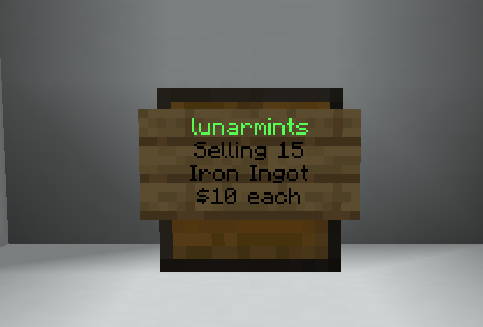
- A sign with your name and the price will appear in front of the chest; this means you have set up your shop successfully!
- Fill up the chest with the item, and you are done!
How do I buy things from other playershops?
This is also very simple! Once you've found something you deem worthy of buying, simply left-click the sign placed on the chest. Information regarding the item will pop up on the left side of your screen. With the information given, you are able to see a preview of the item, how much the item is, as well as how much of it is in stock!
To finalize the purchase, simply type how much you want to buy, and that should be it! The item should immediately appear in your inventory.
Green username = Shop has stock
Red username = Shop doesn't have any stock
Frequently Asked Questions/Concerns regarding playershops!
There have been some concerns regarding player shops, and to ensure all players know exactly what they're getting into, we'll be more than happy to provide more information regarding playershops here!
Some friendly reminders regarding playershops:
- If you rent a plot and that rent expires (meaning you did not pay it in time for it to renew), your build and everything on it will be automatically deleted, and those items will not be returned.
- Scamming or tricking a player into buying an item disguised as a different one is prohibited and will result in punishment.
- Every player is only able to rent one plot at a time.
- Farms are not allowed at /warp playershop
Command for Playershops!
-
/qs buy - Changes a shop to BUY mode
-
/qs sell - Changes a shop to SELL mode
-
/qs price - Changes the buy/sell price of a shop
-
/qs remove - Removes the shop you're looking at
-
/qs staff - Manage your shop staff
-
/qs create - Creates a new shop from the targeted chest
-
/qs find - Locates the nearest shop of a specific type
-
/qs item - Change shop item of a shop
All commands can also be found in the discord smp : cmds channel!